

Description
Download 123 Watermark – free Windows watermarking tool
Overview
123 Watermark is a free Windows application created by Globosoft SRL that belongs to the Graphic & Design tools category. It gives photographers, graphic artists, marketers, and small‑business owners a fast, reliable way to protect their visual assets by adding customized watermarks. The interface is intentionally minimalist: you launch the program, drag an image onto the workspace, type or place a logo, adjust opacity, size, and position, then export the protected file. Because it’s built for Windows, the software integrates smoothly with the native file explorer, allowing you to right‑click an image and select “Add Watermark with 123 Watermark” for one‑click processing. The tool is ideal for anyone who wants to guard their intellectual property without learning a complex editor like Photoshop. Whether you’re a professional photographer needing to brand a portfolio, an e‑commerce store owner who wants to discourage image theft, or an artist sharing work on social media, 123 Watermark delivers a secure, low‑learning‑curve solution. Its free‑to‑use licensing, no‑ads environment, and straightforward workflow make it a compelling addition to any Windows‑based creative toolkit.
Key Features and Simple Installation
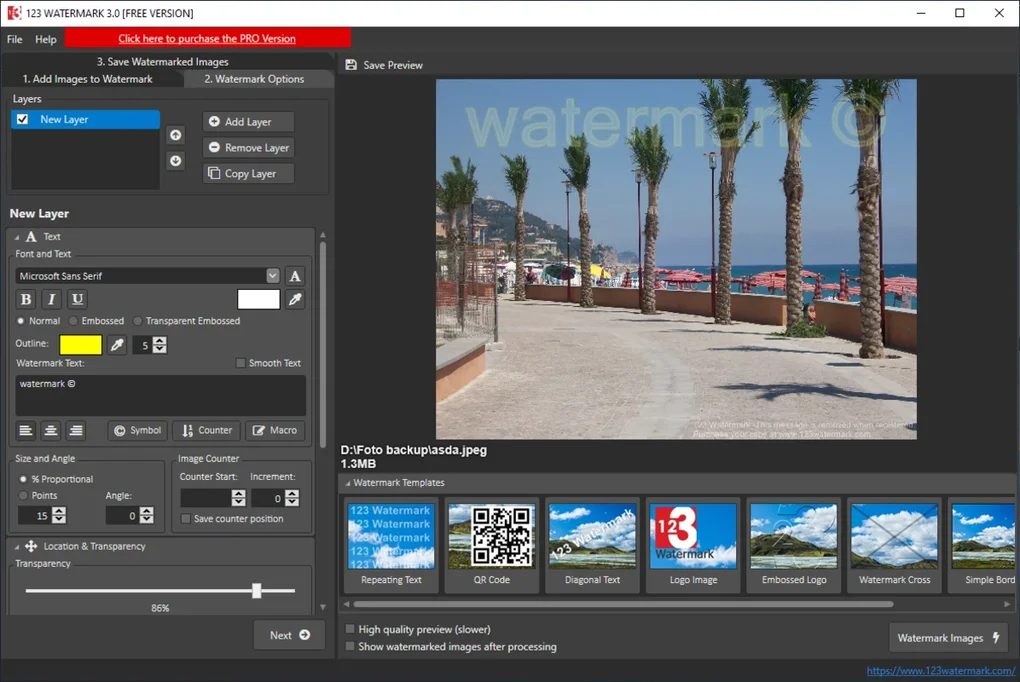
123 Watermark packs a surprising amount of functionality into a tiny installer (under 5 MB). After downloading the installer from the official Globosoft website, you run a typical Windows Setup wizard that asks for the destination folder, creates a desktop shortcut, and registers a context‑menu entry. The whole process takes less than a minute on a modern PC, and because the software is unsigned and free, there are no hidden fees or trial expirations. Once installed, the main window presents three core tabs: Text Watermark, Image Watermark, and Batch Processing.
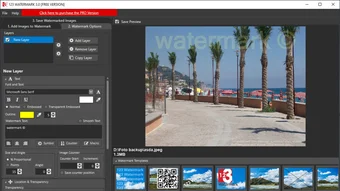
- Text Watermark Designer: Choose from over 30 fonts, set color gradients, adjust rotation, and apply shadow effects. Real‑time preview lets you see exactly how the watermark will appear on the image.
- Image (Logo) Watermark: Import PNG, JPG, or SVG logos, resize them proportionally, and position them anywhere using a drag‑and‑drop canvas. Transparency can be fine‑tuned from 0 % to 100 %.
- Batch Processing: Select an entire folder (up to 5,000 files) and apply a single watermark configuration to all images in seconds. Supports JPEG, PNG, BMP, and TIFF formats.
- Output Options: Save watermarked images in the original format or convert them to a different one, with optional compression settings to control file size.
- Secure Export: The program writes a small metadata tag to each file confirming that a watermark was applied, which can be useful for tracking provenance.
- Auto‑Update Checker: A built‑in feature pings Globosoft’s server once a week to alert you when a new version is available, ensuring you always have the latest security patches.
The installation is straightforward, but for users who prefer a portable approach, a zip‑archive version is also offered. Simply extract the files to a USB stick, run the executable, and you have a fully functional watermarking suite without touching the registry. This flexibility makes 123 Watermark a great choice for freelancers who travel between workstations.
Compatibility, Pros & Cons, and Frequently Asked Questions
123 Watermark runs on Windows 7, Windows 8, Windows 10, and Windows 11 (both 32‑bit and 64‑bit builds). The software relies on native Windows GDI+ for rendering, so no additional runtimes such as .NET or Visual C++ redistributables are required. Because it uses standard file dialogs, it integrates seamlessly with network drives and cloud‑synced folders (OneDrive, Google Drive, Dropbox). The only limitation is that it does not have native macOS, Linux, Android, or iOS versions, but the underlying algorithm is simple enough that third‑party developers could port it in the future.
Pros
- Completely free with no hidden costs or time‑limited trials.
- Intuitive UI that requires virtually no training.
- Powerful batch processing saves hours for large image libraries.
- Lightweight installer and optional portable version.
- Regular auto‑updates keep the program secure.
Cons
- Limited to Windows platforms; no native macOS or mobile apps.
- Advanced image editing features (e.g., layer masks) are absent.
- No cloud‑based watermark library – all assets must be stored locally.
Frequently Asked Questions
Is 123 Watermark truly free, or does it have hidden fees?
The application is 100 % free for personal and commercial use. There are no hidden subscription fees, no ads, and no premium upgrades required to unlock core features like batch processing.
Can I add both text and logo watermarks to the same image?
Yes. After applying a text watermark, you can switch to the Image Watermark tab and overlay a logo on the same canvas. The preview updates in real time so you can fine‑tune positioning.
Does 123 Watermark support high‑resolution images?
The program can handle images up to 30 MP without performance degradation. For extremely large files, batch mode processes them sequentially, preserving resolution and EXIF metadata.
Is there a way to automate watermarking for new photos?
While 123 Watermark does not include a built‑in scheduler, you can combine the portable version with Windows Task Scheduler to run a batch script whenever new images appear in a folder.
How does the program protect my original files?
By default, 123 Watermark creates a copy of the original file in a sub‑folder named Watermarked. This ensures the source image remains untouched, and you can revert any changes if needed.
Overall Rating: 4.5 out of 5 stars
123 Watermark strikes an excellent balance between simplicity and functionality. Its free price tag, batch capabilities, and lightweight design make it a top pick for Windows users who need a quick way to brand their visuals. The lack of macOS support is the only noticeable drawback, but for a Windows‑only audience the application delivers exactly what it promises.
Conclusion & Call to Action
In a market saturated with pricey photo‑editing suites, 123 Watermark shines as a purpose‑built, no‑cost solution for anyone who wants to safeguard their images on Windows. Its streamlined workflow reduces the time spent on repetitive tasks, while the batch processor scales effortlessly from a handful of pictures to thousands. The portable version adds an extra layer of convenience for freelancers who work across multiple machines, and the auto‑update system ensures you stay protected against emerging security concerns. Although a macOS version would broaden its appeal, the current feature set more than compensates for that gap for Windows‑centric creators.
Ready to protect your visual assets with a professional‑grade watermark without paying a dime? Click the button below to download the latest version of 123 Watermark directly from Globosoft’s secure server. Installation takes under a minute, and you’ll be adding custom text or logo watermarks in seconds. Join thousands of satisfied photographers, designers, and business owners who trust 123 Watermark to keep their work safe and recognizable.
Guides & Tutorials for 123 Watermark
How to install 123 Watermark
- Click the Preview / Download button above.
- Once redirected, accept the terms and click Install.
- Wait for the 123 Watermark download to finish on your device.
How to use 123 Watermark
This software is primarily used for its core features described above. Open the app after installation to explore its capabilities.
User Reviews for 123 Watermark 0
No reviews found





